
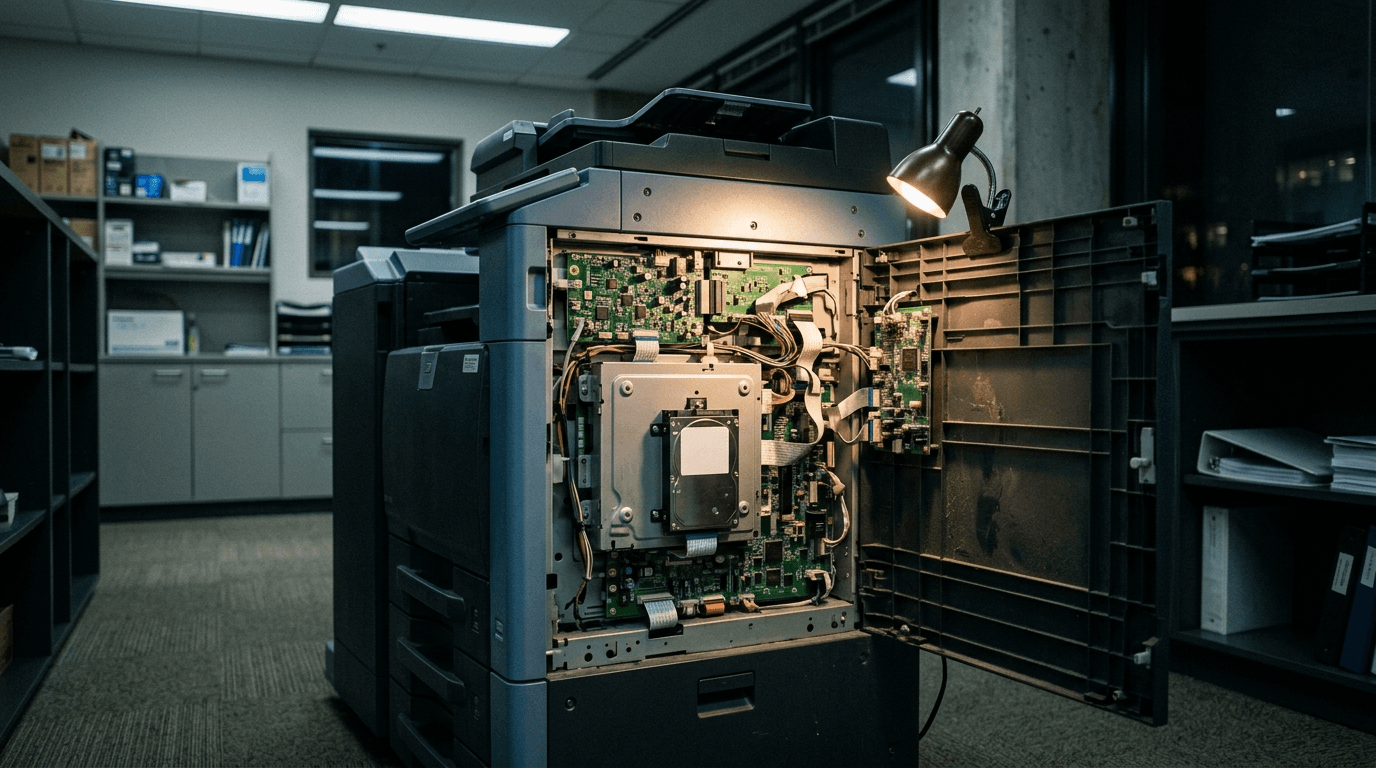
The printer in your copy room is a networked computer with a hard drive, a web admin panel, and a saved copy of an Active Directory password. It almost certainly still has its factory admin password, and its firmware almost certainly hasn't been updated.
That combination is what makes the printer worth an attacker's attention. It can be the quietest way onto a network that's otherwise reasonably well defended.
Here's what's actually on the device, what attackers do with it, and what to fix — starting with three changes that cost nothing and take an afternoon.
Why does nobody treat the printer as a security risk?
Because it doesn't look like one. HP surveyed IT decision makers and knowledge workers at small and mid-sized businesses and found that "66% of SMB knowledge workers assume printers are secure simply because they're on the office network or behind an internal firewall." Half don't think of printers as a security threat at all.
The people who should know better aren't much better. In the same research, 57% of IT decision makers said print security is a low priority in their security strategy, and 69% of SMB IT leaders agreed print security needs improvement.
Patching tells the same story. HP's 2025 print estate research found that "just 36% of ITSDMs apply firmware updates promptly" — ITSDMs being IT and security decision makers — and that "more than half (51%) of ITSDMs cannot confirm if the printer has been tampered with."
So the device gets bought, plugged in, and forgotten. It then sits on the network until something replaces it, which is usually years later.
What's actually stored on a multifunction printer?
More than most owners expect. NIST's guidance on replication devices is blunt about the storage problem: "Potentially all of the information that was ever processed, stored, or transmitted by the device could remain in the nonvolatile storage indefinitely."
In practice that means three things worth stealing.
Document images. Every contract, tax return, medical form and payroll run that crossed the glass may still be on the drive.
Directory credentials. Scan-to-email and scan-to-folder need an account to authenticate with. That account's credentials live in the printer's configuration.
The address book. Names, internal email addresses and file server paths — a map of your organization, handed over without a fight.
NIST also names the two conditions that make all of it reachable: "Many devices have default passwords which can be easily obtained and used to access configuration panels, stored data, or to control the device locally or remotely via a web interface," and unused ports left enabled: "When unused ports/protocols are not disabled, attackers may be able to access a machine undetected."
What is a pass-back attack?
A pass-back attack turns your printer into a credential thief. The attacker reaches the printer's admin panel, repoints its LDAP or SMB settings at a server they control, then triggers a lookup or a scan. The printer obediently authenticates to the attacker's server and hands over the stored password in the process.
This isn't theoretical. Rapid7 found it in Xerox VersaLink C7025 devices and got two CVEs assigned, CVE-2024-12510 and CVE-2024-12511, the second rated 7.6 High by NVD and tagged CWE-522, insufficiently protected credentials.
Rapid7's description of the consequence is the part to read twice: "If a malicious actor can successfully leverage these issues, it would allow them to capture credentials for Windows Active Directory. This means they could then move laterally within an organization's environment and compromise other critical Windows servers and file systems."
The same researcher found the same class of flaw in a Konica Minolta bizhub 227. He first contacted the vendor in May 2024 and published on June 30, 2025 with the bug still unfixed. CVE-2025-6081 still lists firmware GCQ-Y3 and earlier as affected.
Fourteen months, no patch. That's the printer patching experience in one example.
Xerox did ship fixed firmware for the VersaLink — versions 57.69.91 and earlier are the affected ones, so check yours is newer. When a vendor won't patch at all, you're left with compensating controls: change the admin password, restrict the admin panel to a management VLAN, point scan and directory lookups at a low-privilege account, and put the device on the replacement list at next refresh.
Printer vulnerabilities disclosed in 2024-2026
In June 2025 Rapid7 disclosed eight vulnerabilities affecting 748 printer models across five vendors — 689 Brother models, plus devices from FUJIFILM Business Innovation, Konica Minolta, Ricoh and Toshiba Tec.
The worst of them, CVE-2024-51978, rated 9.8 critical by Rapid7, works like this: "An unauthenticated attacker who knows the target device's serial number, can generate the default administrator password for the device." A second bug in the same set leaks the serial number to anyone who asks, over HTTP, IPP or SNMP.
Rapid7 notes that Brother "has indicated that this vulnerability cannot be fully remediated in firmware, and has required a change to the manufacturing process of all affected models." Devices already on desks can't be patched out of it. Changing the default admin password is the fix.
Printer risk isn't confined to the hardware either. Canon's March 2025 service notice covered CVE-2025-1268, a CVSS 9.4 out-of-bounds flaw in widely deployed printer drivers that can allow arbitrary code execution. That one runs on the workstation.
And the print management server is a target in its own right. Huntress observed active exploitation of PaperCut NG/MF beginning August 26, 2026, chaining CVE-2026-81578 and CVE-2026-82078 into pre-authentication remote code execution. Huntress reported that 47% of the roughly 2,500 PaperCut installations it tracks were running v23 or older. Fixed versions are 24.1.10, 25.0.13 and 26.0.5.
If you run PaperCut, stop reading and go check your version.
| CVE | Affected | Rating | Status | What to do |
|---|---|---|---|---|
| CVE-2024-51978 (one of eight disclosed across 748 models) | Brother, 689 models | 9.8 critical (Rapid7) | Not fully fixable in firmware | Change the default admin password |
| CVE-2024-12510, CVE-2024-12511 | Xerox VersaLink C7025, firmware 57.69.91 and earlier | 7.6 High for CVE-2024-12511 (NVD) | Fixed firmware released | Update firmware, use a low-privilege scan account |
| CVE-2025-6081 | Konica Minolta bizhub 227, firmware GCQ-Y3 and earlier | 6.8 Medium (NVD) | Unfixed at disclosure | Segment, change credentials, restrict admin access |
| CVE-2025-1268 | Canon printer drivers v3.12 and earlier | 9.4 (Canon) | Fixed in v3.15 and later | Update drivers on workstations |
| CVE-2026-81578, CVE-2026-82078 | PaperCut NG/MF before 24.1.10, 25.0.13, 26.0.5 | 9.8 and 9.1 critical (NVD) | Exploited in the wild since August 2026 | Patch immediately |
The copier lease is a compliance problem
Affinity Health Plan returned leased photocopiers without wiping the hard drives. HHS settled with them for $1,215,780, over ePHI belonging to "up to 344,579 individuals."
Read what they were actually cited for: the plan "failed to incorporate the electronic protected health information stored in copier's hard drives in its analysis of risks and vulnerabilities as required by the Security Rule." Nobody had thought about the copier. That's the whole failure.
The FTC has published plain guidance on this for years, and it names the contract clause to insist on: that "your company will retain ownership of all hard drives at end-of-life, or that the company providing the copier will overwrite the hard drive." It also recommends you "securely overwrite the entire hard drive at least once a month."
PCI has no printer-specific rule, and doesn't need one. Its scoping FAQ says "all system components in the network are considered part of the cardholder data environment unless adequate network segmentation is in place." A printer on the same flat network as your card processing is in scope. Segmenting it off takes it back out.
What to fix first
Three of these cost nothing and take an afternoon. Do them before anything else.
- Change every default admin password. Every printer, every MFP, documented in your password manager. This is the single fix that neutralizes the Brother chain and most pass-back paths. NIST lists it first too: "Change vendor default passwords (IA-5)."
- Use a low-privilege service account for scan-to-folder and LDAP lookups. Never a domain admin. If a pass-back attack succeeds, this is what decides whether the attacker gets one file share or your whole directory.
- Get printers off the flat network and off the internet. A segmented print VLAN limits what a compromised device can reach, and takes printers out of PCI scope at the same time.
Then work through the rest over the next quarter.
- Disable the ports and protocols you don't use — Telnet, FTP, raw 9100, SNMP v1 and v2c. NIST: "Disable unused physical and network ports (CM-7)."
- Turn on drive encryption and immediate image overwrite. Both are settings already in your device's admin panel. NIST calls for encryption of nonvolatile storage (SC-13, SC-28) and immediate image overwrite (MP-6) as standard controls.
- Put firmware on your patch schedule alongside servers and endpoints, and subscribe to your vendor's security bulletins.
- Fix the lease before you sign it. Hard drive ownership language in the contract, and a documented wipe on every device that leaves the building.
Add printers to your asset inventory while you're at it. You can't patch what nobody has written down.
Frequently asked questions
Can a printer really be used to hack a network?
Yes. The documented path is a pass-back attack: an attacker reaches the printer's admin panel, repoints its LDAP or SMB settings at a server they control, and captures the stored credentials when the device authenticates. Rapid7 demonstrated this against Xerox and Konica Minolta devices, noting it can yield Active Directory credentials and enable lateral movement.
Do office printers store copies of what they print?
Many do. Multifunction devices with internal drives retain document images, address books and saved credentials. NIST warns that potentially all information ever processed by the device could remain in nonvolatile storage indefinitely. Immediate image overwrite and drive encryption are the settings that address it, and both are often off by default.
How do I check what firmware my printer is running?
Print a configuration page from the device's control panel, which lists the model, firmware version and network address, or browse to the printer's IP address and read the status page. Write both down. You need the exact model and firmware version to tell whether a published CVE applies to you, and that pairing is what belongs in your asset inventory.
What do I do with a copier at the end of its lease?
Wipe or destroy the drive before it leaves the building, and document that you did. The FTC recommends negotiating contract terms so you retain ownership of the hard drive at end of life, or the leasing company overwrites it. Affinity Health Plan paid $1,215,780 to settle a HIPAA case that began with unwiped leased copiers.
Are home office printers a risk too?
Less so, because they rarely hold directory credentials and usually aren't reachable from your corporate network. The risk shifts to the documents themselves: work files printed at home sit outside your controls entirely. If staff print client or patient material at home, that belongs in your acceptable use policy rather than your firewall rules.
Sources and further reading
- HP — The Overlooked Security Threat Putting Small Businesses at Risk — SMB print security survey figures. Accessed September 2026.
- HP Wolf Security — Securing the Print Estate — firmware patching and tamper-detection figures, 803 respondents. Accessed September 2026.
- NIST IR 8023 — Risk Management for Replication Devices — storage, default passwords, open ports, and the control list. Published 2015.
- Rapid7 — Xerox VersaLink C7025 pass-back attack — CVE-2024-12510 and CVE-2024-12511. Accessed September 2026.
- Rapid7 — Multiple Brother devices, multiple vulnerabilities — 748 affected models, CVE-2024-51978. Accessed September 2026.
- Huntress — PaperCut actively exploited — exploitation from August 26, 2026 and affected version data. Accessed September 2026.
- HHS OCR — Health plan settles photocopier breach case — Affinity Health Plan settlement. Accessed September 2026.
- FTC — Digital copier data security: a guide for businesses — lease terms and overwrite guidance. Accessed September 2026.
- Rapid7 — CVE-2025-6081, Konica Minolta bizhub pass-back attack — disclosed unfixed on June 30, 2025. Accessed September 2026.
- Canon — Service notice on printer driver vulnerability — CVE-2025-1268 and fixed driver versions. Published March 2025.
- PCI Security Standards Council — PCI DSS scope and system components — the segmentation rule that puts printers in or out of scope. Accessed September 2026.
Most of this is configuration work, not spending. If you'd rather not audit twelve devices yourself, book a complimentary security assessment and we'll inventory your print estate along with everything else on the network. You can also read how we approach network security for businesses your size.
By Joel Baum, who leads cybersecurity, threat research and compliance at The NetSys Group. NetSys has delivered managed IT, cybersecurity, and cloud services since 1998 to businesses across NY, NJ, CT, PA, and Southwest Florida.
Related reading
 Cybersecurity
Does Your Small Business Need a Firewall in 2026?
Read Article Cybersecurity
PCI DSS 4.0.1: What Small Businesses Must Do Now
Read Article Cybersecurity
Vendor Risk Management for Small Business
Read ArticleAlso on this topic: Google Workspace Security Checklist for Small Business
Discuss network security & firewall management for your business.
Tell us about your current systems, the result you need and your timeline. We will discuss the work, responsibilities and pricing before you decide on an engagement.