
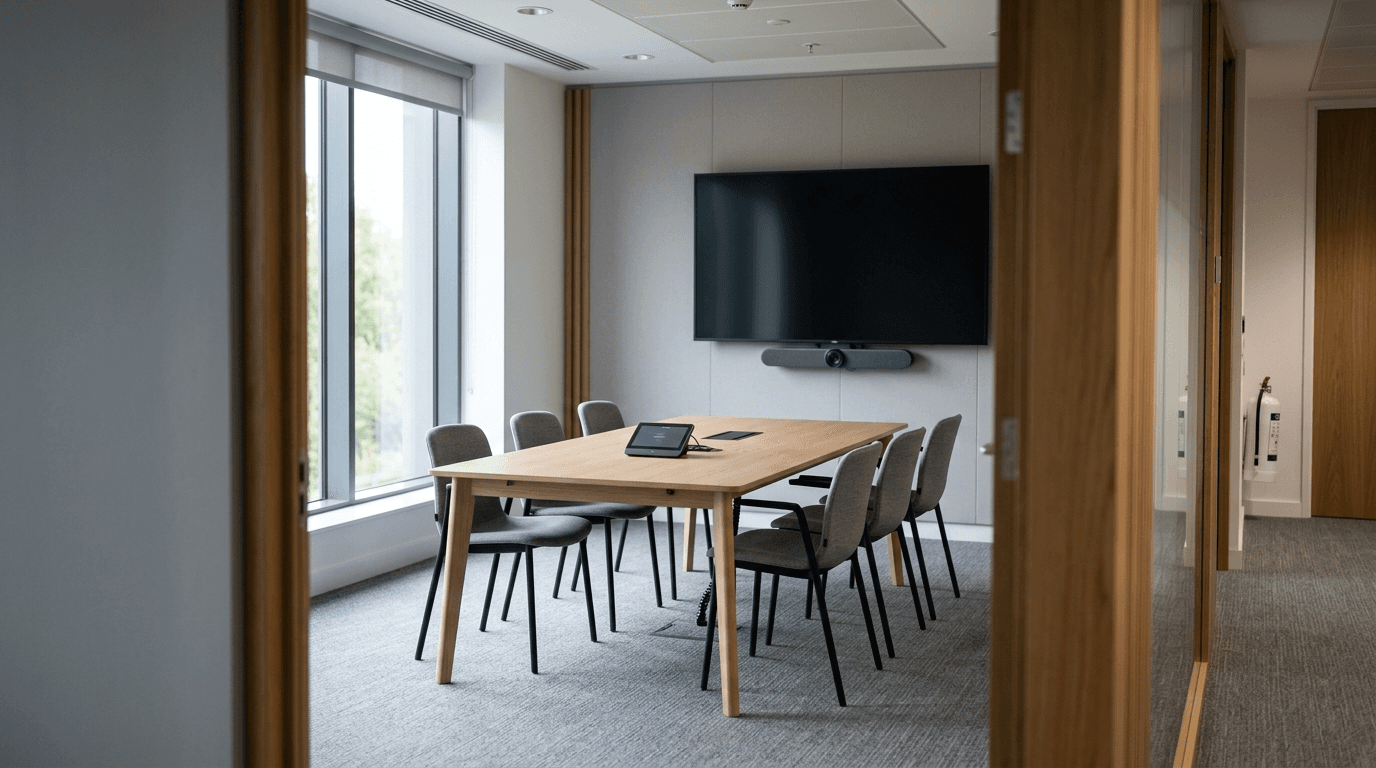
Most small offices don't need to pay for Teams Rooms. Microsoft gives away Teams Rooms Basic for up to 25 rooms, and for a two-room office that runs ordinary meetings, Basic does the job. Pro costs $40 per room per month and earns it only when you need the management, the security controls, or the camera intelligence.
Key takeaways:
- Teams Rooms Basic is free, capped at 25 rooms per organization.
- Teams Rooms Pro is $40 per room per month, paid yearly. That's $480 a room a year.
- Buy Pro for Conditional Access, remote management, door panels, or rooms where hybrid meetings actually matter.
- You license per room, so you can mix the two.
What is Microsoft Teams Rooms?
Teams Rooms is the software that turns a conference room's TV, camera, mic, and touch console into a single Teams device. Walk in, tap the name of the meeting on the console, and you're in. No laptop, no HDMI cable, no dongle.
It runs on certified hardware from vendors like Logitech, Poly, Yealink, Crestron, and Lenovo. The license is separate from the hardware, and that's the part people get wrong when they budget for a room.
What's the difference between Teams Rooms Basic and Pro?
Basic is free and covers one-touch join, wireless content sharing, and the shared whiteboard. Pro is $40 per room per month and adds remote management, device analytics, Conditional Access, front row layouts, dual screens, and intelligent camera features. Microsoft caps Basic at 25 licenses per organization.
That cap is the first filter. Under 25 rooms, you have a real choice. Over 25, the extras have to be Pro.
Teams Rooms Basic vs Pro at a glance
| Feature | Basic | Pro |
|---|---|---|
| Price | Free | $40 per room per month, paid yearly |
| Maximum licenses | 25 per organization | Unlimited |
| One-touch join, wireless sharing, Whiteboard | Yes | Yes |
| Remote management, analytics, alerts | Inventory only | Yes |
| Conditional Access (Entra ID P1 included) | No | Yes |
| Intune and Defender for Endpoint Plan 2 | No | Yes |
| Teams Phone Standard on the room | No | Yes |
| Front row, large gallery, dual screens | No | Yes |
| Intelligent camera and audio | No | Yes |
| Teams Panels paired with the room | No | Yes |
| Zoom, Webex, Meet via Direct Guest Join | Yes | Yes |
| Cross-platform join via SIP | No | Yes, with a paid SIP plan |
Prices from Microsoft's Teams Rooms plan comparison, and inclusions from its licensing page, both checked October 22, 2026.
What only Pro gives you
- Remote management and analytics. Push configuration, see device health, get alerts when a room goes offline.
- Conditional Access. Microsoft Entra policies apply to the room account.
- Front row and large gallery. Remote people sit at eye level along the bottom of the screen, or fill the display in a many-participant view.
- Intelligent camera and audio. Speaker identification, multi-camera support, panoramic room view, AI noise suppression, people counting.
- Teams Panels paired with the room. The tablets outside the door that show whether a room is booked. Microsoft's licensing page says it plainly: "Teams Rooms Basic licenses can be used to license Teams Rooms systems only and not Teams Panels."
How much does a Teams Rooms Pro license cost?
Teams Rooms Pro is $40 per room per month, paid yearly, which is $480 a room a year. Basic is free for up to 25 rooms.
Neither price includes the certified hardware, the display, or installation. Those are the bigger numbers.
The Pro license also bundles more than room features. Microsoft's licensing page lists Teams Phone Standard, Microsoft Intune, Microsoft Entra ID P1, and Microsoft Defender for Endpoint Plan 2 for the room account. Basic lists Teams, Audio Conferencing, and Whiteboard.
When does a small business actually need Pro?
Pro pays off in four situations. If none of them describe you, stay on Basic.
A compliance requirement names Conditional Access
A room account is an identity. If your cyber insurance questionnaire or your regulator expects Conditional Access on every account, the room can't be the exception. Conditional Access needs Entra ID P1, which only Pro includes.
Nobody is in the building to fix the room
With Basic, a room that stops working needs hands on it. With Pro, your IT team sees the failure in the portal and can push configuration without a visit. For a firm with offices in three towns, that difference is the whole purchase.
Your meetings are mostly hybrid and the room is losing
If the people dialing in can't tell who's talking, front row and speaker identification fix a real problem. If everyone in the room is also on their laptop anyway, front row won't help.
You want panels outside the door that work with the room
A Pro license covers the room system and its panel together. Microsoft's Teams panels overview says pairing unlocks "full room alerts and check-in notifications." A panel outside a room with no Teams Rooms device runs on its own Teams Shared Device license instead.
What does a whole room cost?
The license is the small number. The hardware bundle (camera, speakerphone, touch console, and compute unit) runs well past a year of Pro on its own, and the display, mounting, and cabling come on top. Get a quote against the specific room, and budget the install, not just the box.
Then there's the resource account. Every room needs a Microsoft 365 account to hold its calendar, and the Teams Rooms license covers the meeting entitlement on that account. Microsoft's licensing guidance says per-user Microsoft 365 suite licenses "aren't authorized for use on shared meeting devices," so don't budget a Business Premium seat for the room.
A two-room office on Basic: hardware, cabling, and zero recurring license cost. The same hardware on Pro: plus $960 a year. For most small offices, Basic wins, and it isn't close.
Can you mix Basic and Pro?
Yes, and you usually should. Licensing is per room. Put Pro on the board room that runs client meetings and Basic on the huddle room where three people take a stand-up.
Management follows the license. Both tiers enroll in the Teams Rooms Pro Management portal for inventory, but only Pro rooms get detailed device information, remote configuration, and analytics. So you're also choosing which rooms you can fix from a desk.
What to do before you buy anything
Count your rooms and rank them by who sits in them. The room where you pitch clients and the room where you eat lunch have different requirements. One tier for both wastes money in one direction or the other.
Then check the network. A Teams Rooms system is a video endpoint on your LAN, and a room that stutters is usually a switch or business Wi-Fi problem, not a license problem. Our managed IT services team looks at the room and the network together.
Still deciding on the phone side of Teams? Our breakdown of Teams Phone vs RingCentral vs Zoom Phone covers that, and our Teams Phone FAQ answers the licensing questions that come up next.
Frequently asked questions
Is Microsoft Teams Rooms Basic really free?
Yes. Basic carries no license cost and is available worldwide in Commercial, Education, and Non-Profit. You still pay for certified hardware and installation, and the cap is 25 Basic licenses per organization.
Do I need a Microsoft 365 license for each conference room?
Not a user license. Each room gets a resource account for its calendar, and the Teams Rooms license, Basic or Pro, covers the meeting entitlement on that account. Per-user suite licenses aren't authorized for shared meeting devices anyway.
Can I use a regular PC instead of certified hardware?
Not for Teams Rooms. Both licenses require a certified Teams device. A PC with a webcam running the Teams app works, but you lose one-touch join, the room calendar, and central management.
What happens if I stop paying for Pro?
The room loses Pro Management access. Microsoft's licensing page says unlicensed devices "will lose access to the pro management capabilities until valid licenses are assigned to them." Don't count on an automatic switch to Basic: assign one yourself, which only works under the 25-license cap.
Does Teams Rooms work with Zoom or Google Meet?
Yes, with limits. Certified devices join Cisco Webex, Zoom, and Google Meet through Direct Guest Join, included with Basic and Pro, at up to 720p on one display with no HDMI content sharing. A SIP option adds GoToMeeting, RingCentral, and Amazon Chime at up to 1080p, but needs Pro and a paid SIP dialing plan.
Does Teams Rooms Pro include Intune and Entra ID P1?
Yes. Pro includes Teams Phone Standard, Microsoft Intune, Microsoft Entra ID P1, and Microsoft Defender for Endpoint Plan 2 for the room account, plus Audio Conferencing and the Pro Management portal. That's why Conditional Access works only on Pro: it needs Entra ID P1, which Basic doesn't carry.
How do you set up a new Teams room?
- Create a resource account for the room.
- Assign it a Teams Rooms Basic or Pro license. The Microsoft 365 admin center asks for payment details for Basic even though it doesn't charge.
- Set the room mailbox to accept invitations.
- Sign the certified device in and enroll it in the Pro Management portal.
- Test a real meeting with someone dialing in remotely before a client books the room.
Who fixes a Teams room when it stops working?
On Basic, usually someone in the building, because Basic leaves out remote configuration, peripheral health checks, and alerts. On Pro, your IT provider sees all three in the Pro Management portal. If NetSys manages your Microsoft 365 and network, room problems go through the same help desk.
Planning a new office, an added conference room, or a Teams rollout that has to work the first time? Book a call with an engineer. We'll go through the rooms, the network, and the licensing together and tell you where Basic is enough.

Discuss microsoft 365 management & backup for your business.
Tell us about your current systems, the result you need and your timeline. We will discuss the work, responsibilities and pricing before you decide on an engagement.