

A Help Desk Ticketing System, Included With NetSys Managed IT
Your staff need one place to send IT requests, and somebody needs to see what came in and how fast it was handled. NetSys built its own help desk ticketing system for that. Staff open tickets by email or in a portal with your company's name on it, can get updates by text, and can see where each request stands. Reports show ticket volume, response times and resolution times. It is included with NetSys managed IT at no extra charge, and only our clients can use it.
What does a help desk ticketing system do?
A help desk ticketing system turns each IT request into a ticket that is logged, assigned and tracked until it is resolved. NetSys has its own, built in-house: staff open tickets by email or in a portal with your company's name on it, can get updates by text, and reports show volume, response and resolution times.
Only NetSys clients can use it, and managed IT clients get it at no extra charge.
Closest related page: Outsourced IT help desk services. That page covers the NetSys engineers who answer your staff; this one covers the ticketing system your team uses to log and track requests.
Reviewed by Joel Baum, Founder. Our editorial standards.
Businesses that need to keep track of internal IT and help desk requests: an office manager fielding laptop and printer problems, an internal IT person who wants a queue instead of an inbox, or an owner who wants to know how much time support really takes. The usual answer is a per-agent subscription to one of the large ticketing platforms.
NetSys has its own ticketing software, built in-house, and offers it only to NetSys clients. Managed IT clients get it at no extra charge, so there is no separate ticketing subscription to buy, renew or manage.
One Place for Every IT Request
Staff open a ticket by email or in the portal, give it a category and a priority, and attach a screenshot or file if it helps. Every ticket has a status and a named technician, and the conversation stays on the ticket whether replies go through the portal or by text. Technicians can add internal notes the requester does not see. Your own team, NetSys, or both work the tickets, depending on how your support is set up. Reports show how many tickets came in, how quickly they were answered and how long they took to resolve. The phone still works: urgent problems go to the NetSys help desk, where an engineer answers.
What the NetSys ticketing system does
Tickets by email or portal, replies by text
Staff use whichever is easiest, and the conversation stays on the ticket.
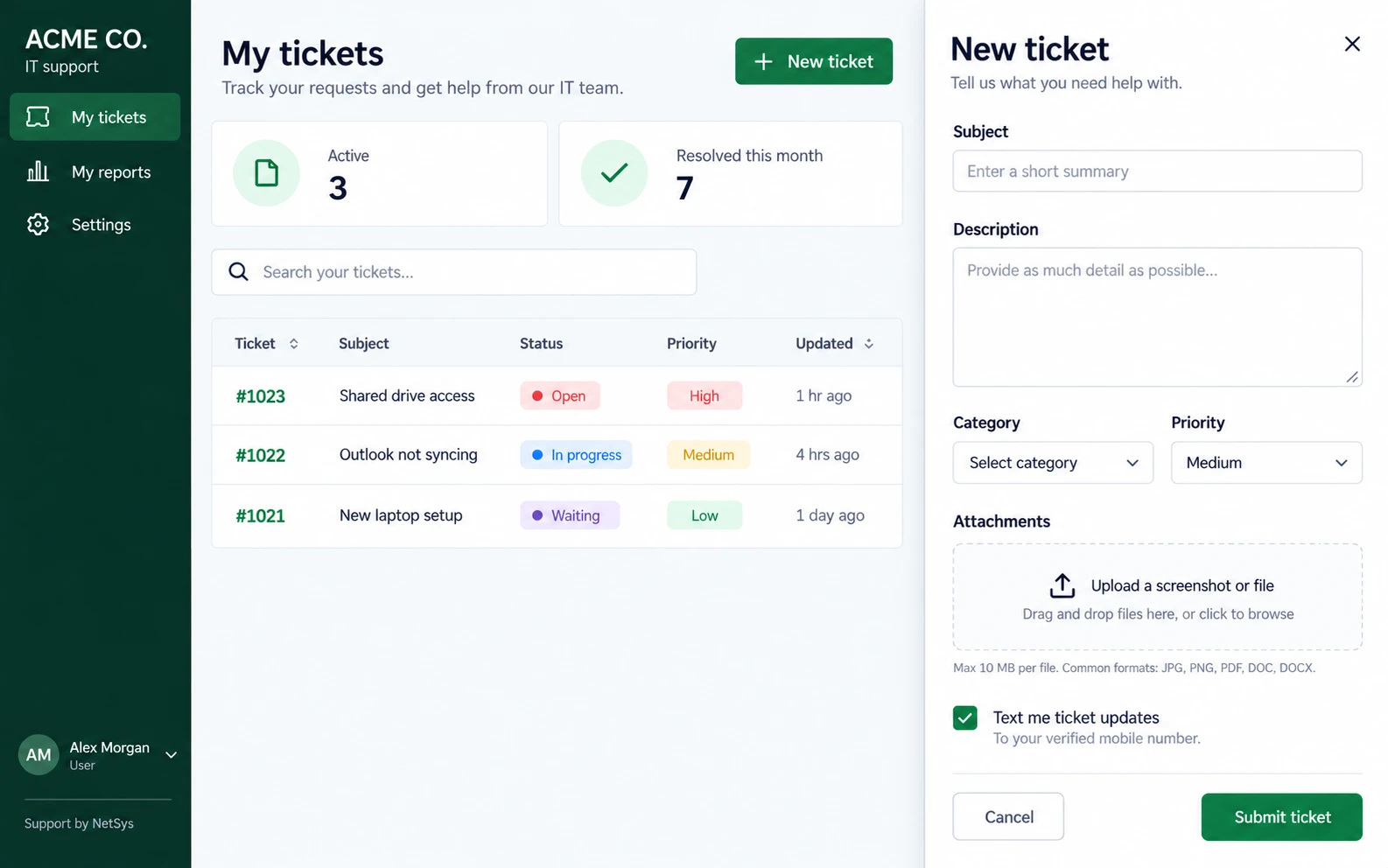
- Send an email, or open a ticket in the portal with a subject, description, category and priority
- Attach screenshots and files up to 10 MB each: JPG, PNG, PDF, DOC or DOCX
- Opt in to ticket updates by text, sent to a verified mobile number
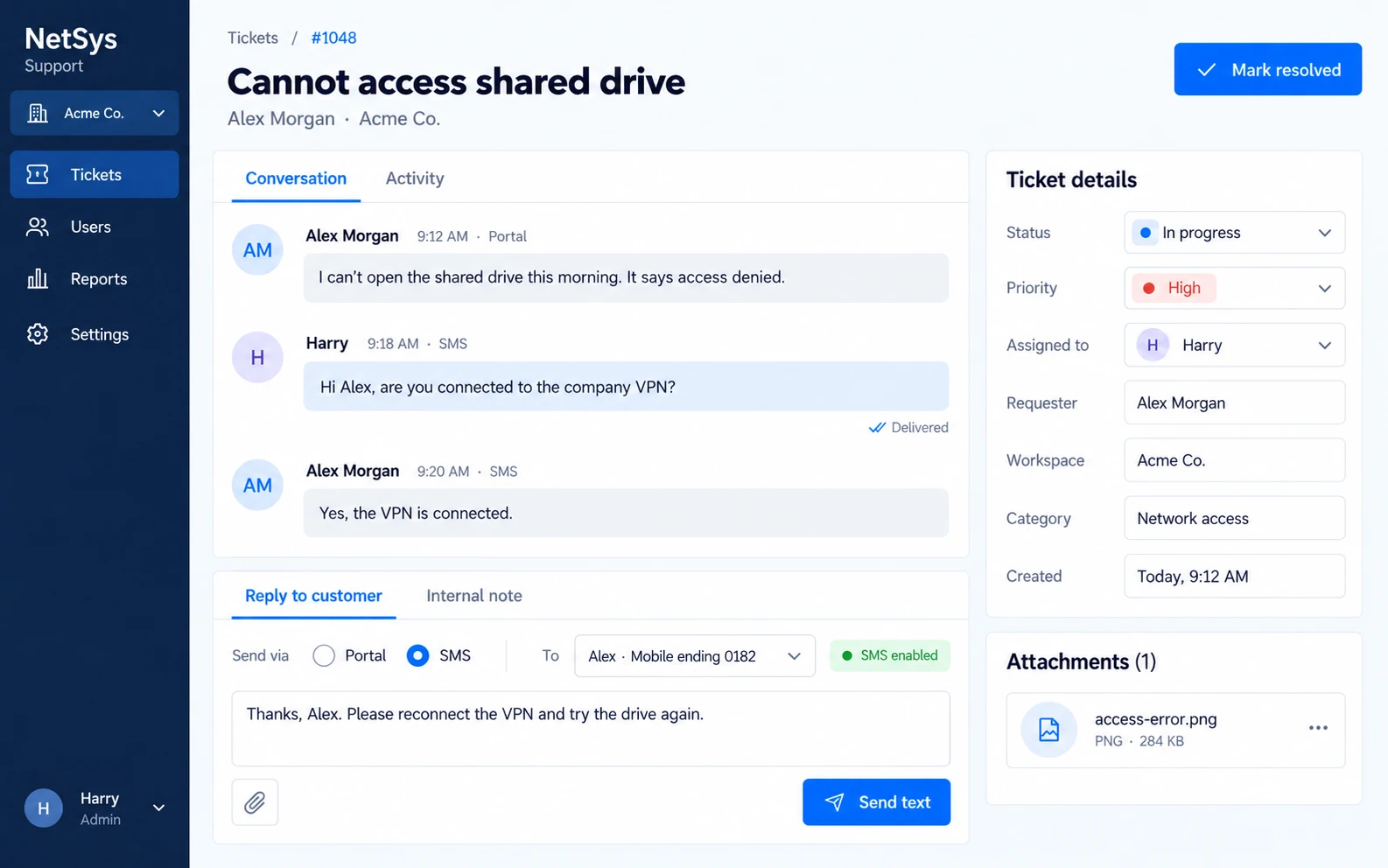
- Technicians reply through the portal or by text, and every message stays on the ticket
A priority, a status and an owner on every ticket
Nothing waits in a shared inbox.
- High, medium or low priority on every ticket
- A status that moves from open to in progress, waiting and resolved
- A named technician assigned to each ticket
- Internal notes for technicians, kept out of the requester's view
Reports on volume, response and resolution times
The three numbers that show how support is really going.
- Ticket volume: how many requests came in
- Response times: how quickly tickets were answered
- Resolution times: how long tickets took to resolve
- Staff see their own active and resolved tickets in the portal
Included with NetSys managed IT
No per-agent license, and no extra vendor.
- No extra charge for NetSys managed IT clients
- No per-agent subscription to buy, count or renew
- A portal in your company's name, with each client kept in its own workspace
- Only available to NetSys clients; it is not sold as standalone software
What the ticketing system looks like
Two screens from the NetSys ticketing system, shown with sample data.
Why NetSys clients use our ticketing system
Tell us how your staff report IT problems today, who handles those requests and what you would want to see in a monthly report. A NetSys engineer will explain how the ticketing system would fit into a managed IT agreement. Call 845-203-3914 or request a call.
Who does the work: meet the NetSys team on our About page.
- No per-agent subscription: it is included with NetSys managed IT
- Tickets by email or portal, with updates by text for staff who opt in
- A priority, a status and a named technician on every ticket
- Reports on volume, response and resolution times show where support time goes
- Built in-house by NetSys, so there is no extra vendor in the middle
- The phone still works: calling our help desk reaches an engineer
- Month to month, like every NetSys agreement
Scope, process and planning details
Which IT support page you need
This page is about the software your staff use to log requests. The people and the service behind it are described on these pages.
| Page | Use it when |
|---|---|
| This page: Help desk ticketing system | You want to see the ticketing system your staff use to log and track IT requests, included with NetSys managed IT. |
| IT support | Your staff need a help desk to call and every device patched, monitored and protected: the day-to-day support side of IT. |
| Small business IT support | You run an office of 5 to 75 people and want the small-office scope, what it includes and how it is priced. |
| Outsourced IT help desk | You only want the help desk handed off: employee requests, password resets and troubleshooting, standalone or beside your IT team. |
| On-site IT support | The problem needs hands in the office, such as hardware, cabling or a rollout, and the office is within about 50 miles of Brooklyn. |
| Remote IT support | Your office is more than about 50 miles from Brooklyn, or your staff work remotely, so support has to arrive over secure connections. |
| 24/7 IT support | You need to know exactly which parts run around the clock (monitoring and emergency service) and which keep staffed hours. |
Related pages: IT support · Small business IT support · Outsourced IT help desk · On-site IT support · Remote IT support · 24/7 IT support.
What a separate ticketing subscription costs
The large IT help desk platforms charge per agent, per month, and the features most IT teams expect often sit above the entry plan. Their published list prices:
| Platform | Entry plan, per agent per month | What sits above the entry plan |
|---|---|---|
| Zendesk for employee service | Suite Team: $29 billed yearly, $39 monthly | Service catalog, IT asset management and SLAs start at Suite Growth, $59 billed yearly |
| Freshservice | Starter: $19 billed yearly, $29 monthly | Service catalog and SLAs start at Growth, $49 billed yearly; change and release management at Pro, $99 |
| Jira Service Management | Standard: $25 monthly for a 10-agent team, or $2,500 a year | Free for up to 3 agents; change management is in Premium |
| HaloITSM and HaloPSA | $99 billed yearly, for 1 to 24 agents | Five-agent minimum, and a required onboarding package priced separately |
| ServiceNow ITSM | No published price | Quoted on request |
Published list prices in US dollars for a US buyer, read on each vendor's pricing page on 8 October 2026. Vendors change prices and vary them by region, so check before you budget. NetSys managed IT clients pay nothing extra for the NetSys ticketing system.
A ticketing system or a help desk service?
The two are often confused. The ticketing system is software; the help desk is the people who answer:
| Ticketing system (this page) | Help desk service | |
|---|---|---|
| What it is | Software that logs each request as a ticket and tracks it until it is resolved | People who answer your staff's requests and fix the problems |
| At NetSys | Our in-house system: tickets by email or portal, replies by text, and reports on volume, response and resolution times | Engineers answer seven days a week, 4 a.m. to 11 p.m. Eastern time, with emergency service 24/7 |
| Who it suits | Clients who want every IT request on record, including the ones their own team handles | Businesses that want an outside team answering their staff, standalone or co-managed |
The service side: Outsourced IT help desk services.
The two work together: staff log requests in the ticketing system, and the NetSys help desk takes the calls.
What to look for in any help desk ticketing system
Whether you use ours or buy a platform, these are the questions worth asking before staff depend on it:
- Intake: can staff raise a ticket the way they already work, such as email, and is there a portal for those who prefer one?
- Ownership: is every ticket assigned to someone, so nothing waits in a shared inbox?
- Reporting: can you see ticket volume, response times and resolution times without building the report yourself?
- Cost model: is it priced per agent, per user, or included with the support you already pay for?
- Data: who holds your ticket history, and how would you get it out if you changed providers?
- Fit with support: does logging a ticket replace calling for help, or sit alongside it?
The NetSys system answers the intake, ownership, reporting and cost questions on this page. Ask us about the others for your own setup.
Help Desk Ticketing System FAQs
What is a help desk ticketing system?
A help desk ticketing system turns each IT request into a ticket: a record that is logged, assigned to someone and tracked until it is resolved. It replaces requests scattered across inboxes and hallway conversations with one queue, and its reports show how much support work comes in and how quickly it gets done.
What is included with the NetSys ticketing system?
Ticket intake by email and through a web portal titled with your company's name; a category, a high, medium or low priority, a status and a named technician on every ticket; optional updates by text to a verified mobile number; technician replies by portal or text, plus internal notes; attachments up to 10 MB each in JPG, PNG, PDF, DOC or DOCX; a separate workspace for each client; and reports on ticket volume, response times and resolution times.
How do we start using the ticketing system?
It comes with a NetSys managed IT agreement, so it starts as part of managed IT onboarding rather than as a separate purchase. Your company gets its own workspace and a portal with your company's name on it, and from then on staff open tickets by email or in the portal and can opt in to updates by text.
Who handles the tickets and escalations?
Your own team, NetSys, or both, depending on how your support is set up, and every ticket has a named technician. Urgent problems should go to the phone: the NetSys help desk is staffed seven days a week from 4 a.m. to 11 p.m. Eastern time, an engineer answers, and emergency service is available 24/7.
Can we get the NetSys ticketing system without managed IT?
No. It is only available to NetSys clients, and we do not sell it as standalone software. Managed IT clients get it at no extra charge as part of their agreement.
What does the NetSys ticketing system cost?
Nothing extra for NetSys managed IT clients: it is included in the agreement. The large help desk platforms charge per agent per month, from $19 to $99 on their paid entry plans and often more for service catalogs and SLAs, so a separate subscription grows with every person who works tickets.
How do our staff submit tickets?
By email or in the web portal, where they add a subject, a description, a category and a priority, and can attach screenshots or files up to 10 MB each. Each request becomes a ticket that stays on record until it is resolved, so nothing depends on one person's inbox.
Can staff get ticket updates by text?
Yes. When they open a ticket, staff can choose to get updates by text at their verified mobile number, and technicians can reply by text as well as in the portal. The whole conversation stays on the ticket either way.
More frequently asked questions
Will the portal carry our company's name?
Yes. Your staff see a portal titled with your company's name and marked Support by NetSys, where they track their own tickets. Each client company is kept in its own workspace.
What do the reports show?
Ticket volume, response times and resolution times. Together they show how much support work comes in, how quickly requests are answered and how long fixes take, which is the evidence you need for staffing and training decisions.
Does the ticketing system replace calling the NetSys help desk?
No. Calling our help desk still reaches an engineer, and urgent problems should go to the phone. The ticketing system is for logging and tracking requests, including the ones your own team handles.
Who built the ticketing system?
NetSys did. It is our own in-house software rather than a licensed platform, so there is no per-agent license fee to pass on to clients.
Every IT request on record, without another subscription.
Tell us how your staff report problems today and who handles them. We will show you how the NetSys ticketing system fits into a managed IT agreement, month to month.